Showing posts with label Tech Talks. Show all posts

Friday, May 08, 2009

Windows 7 is NOW free for a Year! Grab your copy of Windows 7 RC

May 6, 2009 and till June 2010, Microsoft is allowing free downloads of the Release Candidate version of Windows 7 to the public. As part of Microsoft's Customer Review Program, the RC version will be free to download and will be "available at least through June 30, 2009" with no limits on the number of downloads of product keys available, sites claim.

Windows 7 comes nearly three years after Windows Vista, which took five years for Microsoft to engineer but was regarded by some as underwhelming. Microsoft hasn't said when the final Windows 7 version will be released, although it's rumoured to be out before year's end, according to an Indian PC Magazine, PCWorld.in.

Microsoft warned it is not offering technical support for the Windows 7 release candidate, so those who install it are on their own. Users should be familiar with installing an operating system from scratch, formatting a hard drive and backing up data, among other skills, Microsoft advised.

In the Windows 7 release notes, Microsoft warns of several problems that haven't been resolved, including issues with its latest web browser, Internet Explorer 8 (IE8).

Debugging JavaScript with the developer tools in IE8 could throw up a warning that a website is not responding, but that warning can be ignored. Also, some web pages may have misaligned text or missing images. Microsoft recommends clicking on the "compatibility view" button on the address bar as a fix.

Windows XP users should back up their data and do a clean install of the Windows 7 release candidate. Here’s requirements for Windows 7 Ultimate: To run the 32-bit version of the release candidate, a computer should have a 1GHz or faster processor, 1GB of RAM, 16GB of hard disk space and a DirectX 9 graphics processor with WDDM (Windows Display Driver Model) 1.0 or higher driver. For the 64-bit version, Microsoft recommends a 1GHz or faster processor, 2GB of RAM, 20GB of hard disk space and a DirectX 9 graphics processor with WDDM 1.0 or higher driver. 

When Microsoft launched the beta version of its latest operating system in January this year, it revealed it would restrict the preview to the first 2.5 million users, which caused a stampede that brought the company's severs to their knees. Microsoft restarted the launch the next day after sorting out the mess and adding more bandwidth and servers. Later, Microsoft dropped the download limit and extended the time it would be available to a full month.

Update: FREE WINDOWS 7 TO END EARLY WITH SHUT DOWN
Microsoft has announced that the Windows 7 Release Candidate (RC) will automatically shut down on a regular basis months before the final public preview is due to expire next year. The software giant had previously promised that the Windows 7 RC, which is available now for free, would work until August 1, 2010. However, the company plans to take a heavy-handed approach to encouraging people to upgrade to the full retail version from next March.


More interested topics about Windows 7:

Wednesday, May 06, 2009

Nepalese Students, Give Your Career A Head Start With An Enriching Students To Business Internship: Microsoft Students to Business Program for Nepalese Students

Logo: Microsoft-Students-to-Business Most probably one of the best news ever for Nepalese students from Microsoft. It’s high time for Microsoft Students to Business Program for Students, a community initiative designed to connect Microsoft partners and customers with qualified students for entry level and internship positions with technology students from leading universities and colleges. The program is currently accessible in Australia, Indonesia, Malaysia, Nepal, New Zealand, Philippines and Singapore.

Students can access IT Academy Students Pass of free e-learning courses, free software- DreamSpark, career insights in Microsoft Developer Network thru free certification and training compliments of Microsoft. The processing with S2B program is rather easy- apply, create a new profile, develop your IT skills and apply for the right internship or job. The S2B program makes that possible through internships with top Microsoft partner companies – internships that provide relevant work experience on innovative projects that greatly enhance students’ value in the job market. Visit the offers page for Various companies.

The objective of the S2B program is to inspire local businesses to communicate the Microsoft technology competency requirements for new talent, to evaluate the skills of students ready for an entry-level job or internship and collaborate with Microsoft and local education institutions to provide the curriculum and training needed to ensure students are prepared to meet the innovation needs of company’s around the globe. Students engaged in S2B benefit from unique mentoring, training and certification opportunities. Various offerings are available to students at each stage of S2B – when profiling, in application and after their job connection.

When you register to the S2B portal you will receive a FREE Microsoft exam certifications that is worth around NPR 5,000. Without such certification, it is difficult to get noticed by hiring managers. Start showing the companies in Nepal and around the world that you and the students from your college mean business by certifying on the technology that you already know. Microsoft will help you by providing you with a FREE* certification exam from now until June 30th, 2009.

Start now by registering at the S2B portal and send an email to them (email address provided at the portal pages) to get your exam voucher. In Nepal, you can contact Mr Allen Bailochan Tuladhar of Unlimited Techonologies, tel: 977-1-2011302/3.

Friday, May 01, 2009

NT warns of SMS Virus(SymbOS.Hatihati.A) in Your Mobile- Remove Mobile Viruses Now

Nepal Telecom has warned it’s mobile, both prepaid plus post post users to be alert of SMS Viruses in mobile handset or memory after discovering thousands of mobiles infected. It’s usually a Trojan horse/Worm named SymbOS.Hatihati.A (not a virus in fact) that effects Symbian OS common to most Nokia Mobiles and sends international SMS from your account balance without your permissions. Plus, you could be victimized on playing games that try to send user data to their servers.Infected Mobile Screen: SMS_virus_SymbOS.Hatihati.A (Img from NTC)

The trojan, SymbOS.Hatihati.A is a pirated version of the anti-theft software Guardian v0.95 which contains a bad configuration file aimed at attacking and malfunctioning your handset memory configuration. The trojan horse resides at Mobile Memory and tries to send volumes of SMS (Short Messaging Service) automatically (without even displaying any text sent to users) to predefined numbers listed below:

• 3355713230
• 3203848325
• 3474935252
• 3207012810
• 3932590983
• 3396003964

Most of the trojans, viruses & malwares including this SymbOS.Hatihati.A resides in memory cards eg SD, MicroSD, HDSC, MMC, XD etc and spreads by automatically replicating to new devices, sends voluminous txt due to virulent configuration to the mobile handsets. This malware does not spread via sharing or transfer of SIM from one mobile phone to another, nor via Bluetooth or Infrared.

Please, refer to official NT website for following clauses:

  • Check if your NT Pre-paid number or Post-paid number is infected
  • Common symptoms of Hatihati.A malware infection
  • Location of Hatihati.A malware icon in the mobile set
  • Ways of spreading viruses
  • Mobile units that are prone to Hatihati.A malware – N70, N73, N80, Nokia 6680
  • How to remove mobile virus/worm SymbOS.Hatihati.A? (Removal processes of the Hatihati.A Malware)
  • Safety & Security Tips for Prevention of the Hatihati.A Malware
  • Step by step information on removing Hati Hati virus

Act Now to update your knowledge about Hati Hati virus:

Update: Mobile version of Kaspersky Antivirus is reported to remove Hatihati.A and other worms to infect Symbian OS, download the trial version or purchase one. Also using Nokia PC Suite to easy removal of the same worm is illustrated in Nepal Telecom’s website.

Wednesday, April 29, 2009

Microsoft Reveals Windows 7 XPM ‘XP Mode’- another plus point of Windows 7

Just after Microsoft announced the availability of their most awaited OS Windows-7, it’s time for another feature that would be much appreciated. It’s called XPM meaning XP Mode inside Windows 7 would be supposed to eliminate all flaws that were stuck with the failure OS Vista. The concept is based on Virtualization providing backward compatibility.

This will let users run applications designed for Windows XP in a virtual machine, this feature was highly missed by every user of Vista. Dubbed ‘Windows XP Mode', the add-on creates an XP virtual environment running under Virtual PC, Microsoft's client virtualisation technology, within Windows 7, said Scott Woodgate, the director of Windows enterprise and virtualization strategy.


The full version of this article is available at ekendraonline.com- redefined to meet more tech

More interested topics about Windows 7:

Friday, April 24, 2009

New Bluetooth 3.0 devices to hit market later this year ‘09

The Bluetooth Special Interest Group (SIG) has recently announced the new Bluetooth 3.0 standard to boost wireless data transfer between devices to 24Mbps from the recent data transfer rate of just 3Mbps for Bluetooth 2.1 standards. In fact, the Bluetooth 3.0 specification is an update from the Bluetooth 2.1 protocol, which was adopted by the group in 2007. bluetooth-3.0-logo

A standards group has approved specifications for a new Bluetooth standard that speeds up wireless data transfers between devices like smart phones and laptops. Bluetooth is commonly used to pair mobile phones with wireless headsets for hands-free talking. It is also used to connect a mobile phone to a laptop to synchronize data or transfer multimedia files without using wires. Over 2 billion devices have shipped with Bluetooth built in, according to Bluetooth SIG report.

The adoption of the standard, and devices based on the Bluetooth 3.0 specification could ship later this year ‘09 or by early next year ‘10 near the holiday season. However, post specification adoption might delay the products on the market. The faster data transfers could lead to its adoption in a number consumer electronics devices beyond just mobile phones.

The Bluetooth SIG has expected Bluetooth 3.0 to make its way into PCs, mobile phones, camcorders, cameras, TVs, digital presenters - devices that consumers use to transfer large data files like those of video, photographs and even entire music libraries.

The standard enables faster data transfers while using less power, giving consumers improved responsiveness and better battery life in mobile devices. It also stabilizes connections between devices, ironing out kinks from earlier standards when connections broke after a device like a cell phone was placed in the pocket. The Bluetooth 3.0 radio is based on Wi-Fi standards, which enables better data throughput while delivers power-saving benefits for mobile devices. It uses short bursts of Wi-Fi to send data, after which the radio is shut off until it is needed again.

More about Bluetooth from the Geeklog. Adopted from the geeklog- ultimate geek knowledge.

Wednesday, April 15, 2009

Microsoft ends Windows XP Support Ends formally

Microsoft will drop Windows XP out of mainstream support today, with the ageing OS moving into extended support as previously announced.

Microsoft's mainstream support, which is usually offered for only five years, actually ran for seven-and-a-half years because of Windows Vista's long delay. Two years ago, Microsoft also extended mainstream support for XP Home and XP Media Center until 2009, and the deadline for the follow-up phase, dubbed 'extended support', until 2014, to match the dates that had been set earlier for the business-grade XP Professional.

According to Microsoft, the transition from mainstream to extended support for Windows XP means that it will only provide paid support - on a per-incident basis, or through its various pre-paid support programmes - and will only offer non-security hotfixes for a fee, and then only to customers who have purchased the Extended Hotfix Support plan.

Microsoft will continue to generate free security updates for Windows XP, and release them via Windows Update, until April 8, 2014.

Windows XP's shift into the first phase of support retirement comes at a time when the operating system remains extraordinarily popular, especially among business users. According to a recent survey by Dimensional Research, 97 percent of the more than 1,100 IT professionals surveyed said that their companies and organisations are still running XP.

The move out of mainstream and into extended support also comes just days after a leaked Microsoft memorandum spelled out a relaxation of the rules for computer makers that want to continue selling new PCs with the aged OS.

OEMs will be allowed to advertise new systems as XP PCs, something that hasn't been allowed since June 2008, and can 'downgrade' a licence for Windows 7 - the operating system that hasn't yet been released - to XP for at least six months after the former's launch.

A Microsoft spokeswoman said that support for XP on a new machine is provided by the computer maker, not Microsoft. "Customers who purchased Windows XP pre-installed on their machines will receive support from their Original Equipment Manufacturer (OEM) per the OEM support policy at time of purchase," she said.

Saturday, April 04, 2009

Gain Allocation for Sallen and Key Biquads

Especially talking about the Sallen and Key Biquads or Circuitry, the flexibility of allocating different gains to different filter sections gives an extra degree of freedom in designing high order filters. This freedom of allocating different gains to different factors is termed as gain allocation, or gain assignment. However, there are no such decisive rules, this flexibility offers an opportunity to improve the overall design.

The different gain allocation at different section would affect the signal strength in each section. Hence, gain allocation can be used to make the maximum and minimum signal strength in the pass band in all sections as uniform as practical. This means the overall gain is shared without making the signal in one particular section either too strong to cause distortion or op amp latching, or too weak that falls below the noise threshold.

This gain allocation- gain compensation and enhancement can be performed for Sallen Key representation of Butterworth filter and similar circuitry. Compensation is done at the early stages where as the enhancement is done at the later stages. The purpose of compensation to do is in the order to avoid clipping.

More interesting topics for Active and Passive Filter Design and other discussions refer to ekendraonline.com.

Saturday, March 14, 2009

New Safari browser version: Safari 4

Safari is the fastest and most innovative web browser for Mac and PC.

itunes_like_interface-of-safari4Now, with Safari 4, you can choose your favorite sites forma  stunning wall of graphical previews with Top Sites. Easily create and arrange multiple webpages in one window using Safari's elegant tabs on top design. Flip through websites as easily as you flip through albums in iTunes with Cover Flow.

Safari 4 is a public beta and is preview software now. Give Apple engineers your feedback on the Safari 4 Public Beta. Just click the bug button in the toolbar to get started.image

Safari 4 has got a complete iTunes like interface and features. Get computing in more tempting way. (click the image to zoom in)

Finally, Safari is in the list of browsers to include the preview of top sites- feature that was initially adopted by Opera.

Sunday, February 22, 2009

Computing securely- a guide to better security of the computing habits

There is no such thing as a completely secure computer or IT network. The number of threats we face from pranksters, all the way to organized crime is growing all the time. In fact, the threats themselves are increasing in both seriousness and sophistication.

It's not just a matter of viruses, Trojans or worms that come attached to an email and then infect your machine. If you are on the Internet, then you are open to attacks of many different kinds, from hackers trying to gain direct access to your computer, malicious web sites tricking you into parting with money, tricks to get personal details such as credit card information or passwords, software slipped onto you PC that will do any number of things without detection - the list is always growing computer, software and the Internet become more feature rich and complex, the number of ways in which attacks can occur also inevitable increases

As a user, we can enhance our online security. There is no fool-proof security system, but it doesn't hurt to be a little careful while on the Internet.

Basic Guidelines

How to protect personal and work data

  • Protect yourself with relevant software from viruses and trojan horses that may steal or modify data on your own computer. A trojan horse program is a software that claims to do something genuine, but does exactly the opposite. For example, a program that claims it will speed up your computer may actually be sending personal PC information to a hacker.
  • Updating the latest anti-virus software and operating system patches. Updates are most important security features. Don't turn off your eyes.
  • Install a personal firewall and anti-spyware to protect your PC.
  • Changing online passwords periodically.
  • Online baking credit cards and bank statements for transactions are to be verified timely to be safe.

Update your browser

  • Most chances that one will probably drag viruses and malwares are browsers. Browser programs are frequently updated to add functionality and address security patches and problems.
  • You the latest browsers and try on more than a single browser eg, Apple Safari, Mozilla Firefox, Google chrome, Opera, etc

Don't let others eat your cookies

  • While you browse the Internet , information about your computer may be collected and stored fraudulently. To increase your level of security adjust your privacy and security setting to block or limit cookies in your web browser.
  • Make sure that other sites are not collecting personal info about you without your knowledge.
  • Delete cookies and temporary files from time to time.

Wednesday, February 18, 2009

Remove autorun viruses from pen drives and Windows drives with smart virus remover

click to zoom in: smart-virus-remover-1 Most of us receive a majority of virus problems which are due to virus which spread through pen drives, cd’s and other portable devices like mp3 players, iPod etc. Smart Virus Remover by Muhammad Abdullah is simple tool which gives you four main options for virus removal, which includes:

  • Delete Autorun.inf files
  • Restore Windows to default settings
  • Remove Virus  from a Folder
  • Remove Virus from USB

This product also removes the problems that are caused by these viruses or after effects, Some of the after effects Removed by this product are

  • Disabling of Task Manager, Registry Editor, Command Prompt, Folder Options
  • reg and vbs file opening problem
  • Folder Options show Hidden files and Folders Problem
  • No Search Option Problem

If your windows drive does not open mouse double click, you can also easily delete those autorun.inf files which stops a drive being opened on mouse double click, this utility will be most help full in such a kind of associations. Hope this tool which will help delete autorun.inf viruses from your computer and also on other portable drives. This small tool will let you remove a group of viruses from your system including the following list of viruses.smart-virus-remover

  • Virus.Win32.Agent.aw.a
  • Virus.Win32.AutoIt.a.a
  • Virus.Win32.AutoRun.abt.a
  • im.worm.win32.sohanad.bm.a
  • im.worm.win32.sohanad.t.a
  • Trojan.Win32.Agent.abt.aTrojan-Downloader.Win32.AutoIt.aa.a
  • Trojan-Downloader.Win32.AutoIt.q.a
  • Trojan-PSW.Win32.OnLineGames.mgw.com.a
  • Trojan-PSW.Win32.OnLineGames.pno.a.com
  • Virus.Win32.AutoRun.ajn.com
  • Trojan Dropper
  • Virus.Win32.AutoRun.abt.a (Smss or Funny Scandal)
  • VirusSe (SE.exe)
  • AntiVirus 2009
  • Virus Asp.net
  • Isass
  • Vbe.virus
  • Virus.Macromedia.Flash
  • 1rfw8hjr.com.Virus
  • dynrn6e.cmd

Download Smart Virus Remover details here @ http://www.troublefixers.com/remove-your-pen-drive-and-autorun-viruses-with-smart-virus-remover/

Tuesday, February 17, 2009

Google Chrome is a no Exception to errors and CPU hungry

click to zoom in: snap-error-in-google-chrome Like Firefox, Google Chrome (a decent Windows Internet Explorer based browser) has been showing problems since it was left up off from the beta tag last time. My personal experience with Google Chrome and it's simple interface and light memory consumption was fantastic until recently I came to discover that Chrome is eating out all of my CPU power. This problem persisted when I browsed more tabs in a single window. (Click the screenshots (snap-error-in-google-chrome.JPG) to view details showing Errors in Google Chrome.)

Internet connectivity was fine, more tabs were browsed simultaneously and later I came to discover that errors in Google Chrome are as no exception. It says: Aw, Snap! Something went wrong while displaying this webpage. To continue, press Reload or go to another page. Is Google going to pay me reload the same data?

google-chrome-consuming-cpu-power

This screenshot (google-chrome-consuming-cpu-power.JPG) shows each tab of Google Chrome is consuming not less than 17 MB of Memory (private working set) @ C:\Users\Jen\AppData\Local\Google\Chrome\Application\0.2.149.29\Installer\chrome\Chrome-bin making the CPU Usage 100% (2x2 GHz)though the Physical Memory is mere 62%.

I tried to find the solution at the official site of Google Chrome but failed to so so. Like fasterfox for loading Firefox faster and working on its prefetch and memory for efficient use of the browser, chrome needs some like when you're running on more active tabs.

Not that late I came to solve a problem showing error of something went wrong.... just refreshed the page after switching off the Wireless Button ie disconnecting from Internet, it worked- the page was displayed correctly but not all pages. This should be solved by Google as Chrome is hitting market like nothing else like.

Link to Google Chrome support: http://www.google.com/support/chrome

Sunday, February 08, 2009

Using Nepali Keyboard layout and Nepali input language in Windows Vista

click to zoom in: nepali keyboard layout preview in vistaUnlike the premature form of Nepali Keyboard layout and input language in Microsoft's Windows XP, Windows Vista offers much improved performance and look for Nepali language. In fact, Vista now support Nepali language very well both in terms of Nepali Keyboard layout and Nepali input language.

This means you can use Nepali language thru Nepali Keyboard layout and even enter words or commands(limited) in Nepali either directly by typing or using the onscreen Nepali keyboard. You can customize your keyboard for a specific language or format by changing the keyboard layout. The layout controls which characters appear on the screen when you press the keys on your keyboard. Few steps tend to finish up us with happiness of using Windows Vista in Nepali language.

Step1. Go to Control panel > Clock, Language, and Region > Regional and Language Options

Step2. Alternative to step1: Type Regional and Language Options in Start Search box of start menu.

Step3. Go to Keyboards and Languages tab in Regional and Language Options wizard.

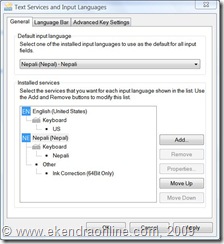
click to zoom in: text services and input languages in vista

Step4. Click Change Keyboards box. On the General tab, click add.

Step5. Add Input languages, choose Nepali. Preview it if you like to.

click to zoom in: add input language in vista

We can also make Nepali (Nepal) as the default input language in vista. Select one of the installed input languages to use as the default for all input fields.

Friday, February 06, 2009

XP to Windows 7 'Upgrade' Scheme Announced by Microsoft- How to upgrade to Windows 7 from XP?

Were you waiting to find how to upgrade to Microsoft's most awaited OS Windows 7 from Windows XP version. Microsoft will help users upgrade from Windows XP to Windows 7 by selling upgrade media, but warned XP users they must do a "clean" installation of Windows 7. That means all data on the XP machine will be lost.

Regarding XP, customers can purchase upgrade media and an upgrade licence to move from Windows XP to Windows 7 and perform a clean installation of Windows 7.  Upgrade actually means upgrading the license and such upgraded license will be discounted according to Microsoft. 

However,  Microsoft has declined to provide pricing for all six editions of Windows 7, or for the XP upgrade licences. More news on all six versions of Windows 7, visit the geeklog article now, here and find out which is the best edition of Windows 7. Microsoft has been aggressively pushing Windows 7's timetable. Just two weeks after it launched the first - and in the end, the only - public beta of the new operating system, the head of Windows development said the company is moving directly to 'release candidate' directly to 'release candidate'.

Microsoft said it was working on ways to help Windows XP users make the move, but would not get specific. "Microsoft plans to have other tools and ways to help people get through that process, but we don't have full details on that at this time".

For more news updates on Microsoft Windows 7, visit out Label: Windows 7 CLICK HERE.

Details about the new Microsoft OS Windows 7 from their official website: http://www.microsoft.com/windows/windows-7/

Wednesday, February 04, 2009

Geek Knowledge Updates for Obama Virus, Acer Smartphone & Eight-core processor

WORM FLOATS OBAMA'S HEAD ON YOUR DESKTOP
The odds are pretty good that this will never happen to you, but should a floating head of U.S. President Barack Obama pop up on your desktop Monday morning, know this: You've been hit with the Obama worm. Though it is not detected by any antivirus products right now, it is not considered to be a serious threat because it has infected so few systems. Because antivirus programs don't detect it yet, it's also hard to know when you've been infected. For more Google the news.

FIRST ACER SMARTPHONE LAUNCHING IN FEBRUARY
Acer is to launch its smartphones at the Mobile World Congress in Barcelona next month. Acer may unveil more than one model and that the phones may use multiple kinds of networks, such as Wi-Fi and mobile. Acer declined to reveal additional details about the devices, such as what operating system the phones will run and when they'll become available on February 16.

INTEL TO DETAIL EIGHT-CORE XEON PROCESSOR
Intel plans to detail an eight-core Xeon processor at the International Solid-State Circuits Conference in San Francisco next month, offering an early look at what appears to be the company's first eight-core chip. Details of the Xeon processor that will be discussed during the February 9 presentation are scarce.

FULL-DISK ENCRYPTION FOR ALL COMPUTER DRIVES
One of the world's largest computer drive makers published the final specifications for a single, full-disk encryption standard that can be used across all hard disk drives, solid state drives (SSD) and encryption key management applications. Once enabled, any disk that uses the specification will be locked without a password -- and the password will be needed even before a computer boots.

Friday, January 30, 2009

Google Delivers Offline Access for Gmail

Google will begin to offer browser-based offline access to its Gmail Webmail application, a much-awaited feature. This functionality, which will allow people to use the Gmail interface when disconnected from the Internet, has been expected since mid-2007.

That's when Google introduced Gears, a browser plug-in designed to provide offline access to Web-hosted applications like Gmail. Gears is currently used for offline access to several Web applications from Google, like the Reader RSS manager and the Docs word processor, and from other providers like Zoho, which uses it for offline access to its e-mail and word processing browser-based applications.

Google ruled out the option of letting users replicate their entire Gmail inboxes to their PCs, which in many cases would translate into gigabytes of data flowing to people's hard drives. It instead developed algorithms that will automatically determine which messages should be downloaded to PCs, taking into consideration a variety of factors that reflect their level of importance to the user. At this point, end-users will not be able to tweak these settings manually.

To activate the offline functionality, users of standalone Gmail service and the standard Apps edition should click "settings" after logging on to their Gmail account. There, they should click on the "Labs" tab, select "Enable" next to "Offline Gmail" and click "Save Changes." A new "Offline" link will then appear in the right-hand corner of the account interface. Users of the Education and Premier Apps versions will have to wait for their Apps administrators to enable Gmail Labs for everyone on the domain first.

Google is also rolling out Gears-based offline access for its Calendar application. However, it will be for now read-only and exclusively available to Google Apps account holders. Previously, Google introduced read-only offline access to the Spreadsheet and Presentation applications in Google Docs, which is also part of Google Apps.

Saturday, January 17, 2009

Taking your typing skills into action: building better typing speed and accuracy

For most of the time or the early computer users would like to enhance their typing speeds. Typo errors are to be meant when dealing with any touch typing programs. Even those which claim to be the best may not always deliver the same, opt for the one that meets your criteria of Basic, Advanced or Professional touch typing things.

Here's few points on how to increase/better typing speed and accuracy reviewing difficult keys improves typing speeds

  • During the first days your typing speed is probably still quite moderate, so give yourself some extra time for your typing tasks.
  • It's extremely essential that you learn the positions of the letter keys and common punctuation by heart- that may refer to more practicing. Ensure the keyboard is of your desired category- QWERTY OR AZERTY OR ....
  • Continue to pay attention to good accuracy. It is much easier to learn error-free typing right away than it is to unlearn poor typing habits.
  • Use your touch typing skills regularly to strengthen them and gain speed. After a week, you should already be typing quite smoothly and within a month you will reach full speed. And even after that you should continue to notice improvements.
  • To avoid physical strain, try to remember to keep a good posture and take regular breaks to relax your hands, arms and eyes- follow Ergonomics.
  • For better performance, set your goals of Typing Speed in wpm- words per minute or cpm- characters per minute(cpm though not always recommended) and accuracy in order of 100%. Revise difficult keys and review progress reports time by time.

Many assistant programs such as TypingMaster Satellite which gathers personal learning and typing behaviors- analyzes typing in other programs if you're a frequent typing person. 

Having been finished the basic accuracy building course from any good typing tutor program, it comes later with the additional typing coursed which can efficiently improves speed and extend skills to cover the whole keyboard. This may include but not limited to- Speed Building course, numbers course at the top row including 10-key number pad, special marks course including exclamations, and so on.

Wednesday, January 14, 2009

Web-based Office to Get Edit Online Function from Microsoft

Microsoft Office Live Workspace Microsoft has announced it will begin a public beta test of web-based office applications in a bid to rival Google Docs. The web-based applications will be delivered through Office Live Workspace and will allow users to create and edit new documents online from within a web browser, said Justin Hutchinson, group product manager for Microsoft's Office Client division.

That's a significant change from the capabilities in the beta of Live Workspace, which was launched last March. This requires users to create new documents in the desktop versions of Word, PowerPoint and Excel on their PC and then save them to the web, where they are stored on Microsoft servers. Others can view the documents online, but editing them requires downloading them to a PC and opening them in Office.

It contrasts with online suites such as Google Docs and Zoho, where the entire process of creating, saving and editing documents is done from inside a browser. Live Workspace marked the first tentative steps by Microsoft to put its lucrative Office franchise on the web. More than 1.5 million people have signed up for the beta since it was released, said Michael Schultz, director of product management and marketing for Office Live Small Business. Microsoft is currently testing a 'technical preview' of the Office web applications, which will allow users to create new documents online without needing to have Office on their PC. The web applications - Word, PowerPoint, Excel and OneNote - include a task ribbon similar to that in Office that lets people 'lightly edit' from inside their browser, including formatting text and tables.

Microsoft plans to roll out a beta of the web applications to Live Workspace testers later this year, though it won't say exactly when or how many people will be allowed to test them. Nor would it say how many are testing the technical preview that came out a few months ago, but it is likely to be a small number. Neither Schultz nor Hutchinson described the Office web applications as a rival to Google Docs, and Microsoft positions its online tools differently. While Google sees online applications as a way to free users from the desktop entirely, Microsoft sees them as a complement to Office in its 'software plus services' model.

Monday, January 05, 2009

Download Opera Mini 4.2 for your cell phone now!

With feature loaded version, Opera Mini 4.2 is a must have for your mobile phone. Downloading for specific handsets is available example for touchscreen sets specified files need to be downloaded. Learn more about Opera Mini features.

Opera Mini The world’s most popular mobile Web browser with over 20 million users is none other than Opera Mini. Here are some of the most deserved features of this best browser Opera Mini 4.2 general version:

  • Synchronize your bookmarks, speed dial and note (with full version of Opera or other versions)
  • Skins (new feature that let's you select skin for your Opera)
  • Auto-complete web address
  • Find in page (finding inside the browsed page made easy)
  • Save browsed pages (If your phone supports JSR-75, you can save Web pages.)
  • Upload and Download files (Again if your phone supports JSR-75, you can upload or download files/pics/data files directly from Opera Mini)
  • View pages in landscape mode (the same best thing in Opera mini * and # thing)
  • Create a custom search! (Create your own web search from any search field on the Internet)
  • Faster scrolling with keypads (the same best thing of 2, 4, 6, 8)
  • Resizing too wide pages (wrapping text)
  • Additional functionality via the context menu

The official website www.opera.com/mini says- Full Web: Opera Mini enables you to take your full Web experience to your phone. Fast: Faster mobile internet as data is compressed before being sent to your phone. Free: Opera Mini is free to download. It is the definitive mobile web browser. Opera Mini is built for speed. Web pages are compressed by up to 90% of its orginal size for speed, saving your time & money. On phones with JSR-75, Opera Mini lets you save pages for offline viewing so you can quickly access and read your desired Web content, even when you’re on a plane, in the subway, or in other places where you can’t get network reception. Depending on your phone, you may need to choose a destination folder for storing pages for offline viewing

Do You know of the Privacy in the Opera Mini browser?

Surprisingly Opera Mini keeps a record of the user's phone number, make, and model for use with maintaining the history, cache and cookies. They say that this is done for the purposes of debugging, maintenance, optimization of the service, or maintaining the customer relationship.

Tuesday, December 16, 2008

HP Updates Desktop Virtualization Software

Hewlett-Packard hopes to widen the use of its desktop virtualization products with new software that will improve video playback and allow the use of USB peripherals such as webcams, the company announced Monday.

HP is also rebranding its desktop virtualization suite as the HP Virtual Client Essentials, and adding Linux support for its broker software, called Session Allocation Manager, which runs only on Windows today, HP said.

Most of the updates concern HP's Virtual Desktop Infrastructure suite, which allows a company to run multiple images of a desktop OS in virtual containers on a server, instead of having to manage a separate OS on each employee's PC.

Virtualized desktops are catching on at some businesses but companies need to provide workers with an experience similar to what they'd expect from a standard desktop PC, and that hasn't always been the case with multimedia content, said industry analyst Roger Kay, president of Endpoint Technologies Associates.

HP said it has solved that problem by developing an enhanced version of Microsoft's Remote Desktop Protocol, which transfers presentation data between thin clients and Windows applications running on a virtualized server.

The existing RDP works fine for relaying basic on-screen data, such as keyboard strokes and mouse movements, but it's not good at carrying rich content such as a training video or webcast, said Manoj Malhotra, product marketing manager for HP's Client Virtualization group.

"The server gets overloaded when it tries to decode a video stream for a large number of users, and some employees end up having a poor experience," he said.

HP's enhanced RDP shifts the burden of decoding video away from the server and onto the thin clients, he said. That will allow companies to stream video to a large number of employees without a deterioration in performance, he said. The new protocol also lets them plug in a wide range of USB peripherals, which don't work well with the existing RDP, according to HP.

HP said the enhanced RDP is aimed at basic productivity workers. The company also has its own RGS (Remote Graphics Software) protocol, which it positions for applications that use higher end graphics, such as CAD programs, or that multiple users access at once.

While the enhanced RDP will be free, HP charges for its RGS protocol. But on Monday it said it has cut the price of RGS to US$35 per seat, from "between $99 and a few hundred dollars" per seat, Malhotra said. It's also allowing customers to use RGS on non-HP servers, which previously was not permitted, he said.

He predicted that the RGS protocol will become more widely used, but HP still expects the enhanced RDP to be used for about 75 percent of virtual desktop deployments.

Sunday, November 30, 2008

In Mumbai, Bloggers and Twitter Offer Help to Relatives, Mumbai Terror Attacks Concerned

Bloggers pitched in offering information and other help to people worldwide as Indian police and commandos battled it out Thursday with armed terrorists in two top hotels and a residential complex in south Mumbai.

On "Mumbai Help", bloggers offered to help users get through to their family and friends in the city, or to get information on them.

Mobile and fixed line circuits to Mumbai were clogged by the large number of people trying to get in touch with people in Mumbai after the crisis. A significant number of the people trapped in the hotels are foreigners, according to media reports.
More people are likely to use mobile phones and technologies like SMS (Short Message Service) to get in touch with relatives than go online, because the number of mobile users outstrips that of online users in Mumbai. But when the phone lines are clogged, some people are realizing that going online may be a good alternative.

People posting on the Mumbai Help blog included a sister trying to get in touch with her brother on a mobile number. A volunteer tried the number, and promptly reported on the blog that the number was busy but she would continue to try.

"We do what we can," said Dina Mehta, an ethnographer by profession, who is blogging on Mumbai Help. "We are certainly providing people emotional support at this difficult time," she added.

Mumbai Help's teams were on Thursday checking out if hospitals have put out the list of the injured and dead, to pass on the information to bloggers and callers. "Till now the lists of dead or injured are not yet put up, which is surprising," Mehta said Thursday afternoon.

Micro-blogging site Twitter is also being used to pass on information, or to just express feelings about the terrorist attack, and sometimes about the inadequate coverage of the crises by some Indian TV channels.

The Taj Mahal Hotel, one of the locations attacked by the terrorists, has used SMS to get its help line and other important numbers to anxious relatives who had people living or visiting the hotel at the time of the attack.

A trapped hotel guest used his mobile phone to send an MMS (Multimedia Messaging Service) video clip of police action to a local TV channel, IBN Live. The channel has been encouraging witnesses to send MMS as part of their citizen journalism program.

Subscribe to Ekendra's feed